
Coach the roster. Keep private health data with the athlete.
Invitations, completion windows, upcoming workload and season dates for the athletes who accept, in one place. Each athlete keeps their own account and privacy controls.
See how the roster work fits together.
The Coach view answers a short list of team questions: who is training, who is missing sessions, and what load is coming. Athlete health records stay closed.
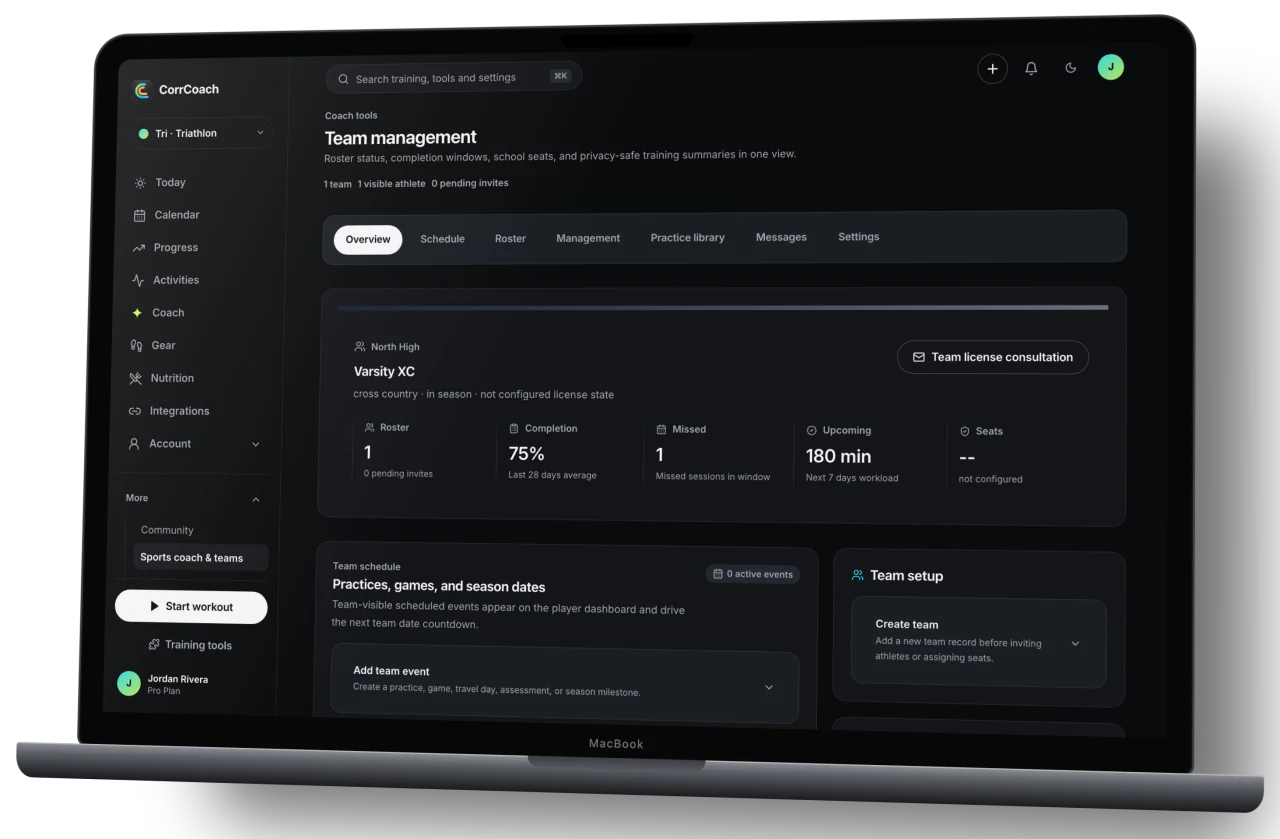
Three questions, answered at a glance.
- Roster status
- Roster identity, invite status, completion percentage, missed-session count, upcoming workload, readiness bucket, sport, season mode, and license seat status.
- Training window
- Coaches can see whether accepted athletes are finishing planned work and when the next heavy stretch lands, without opening private workout detail.
- Season context
- Sport, practice, game, tournament, and season dates give the team a shared planning frame while each athlete keeps an individual CorrCoach account.

Coaches get their answer without opening the athlete’s whole record.
Completion windows, upcoming workload, season dates and roster membership are enough to plan a team week. Private notes, precise routes, raw samples and account details stay outside the Coach workspace.
- Athlete acceptance before roster access
- Bounded training summaries
- Private records stay with the athlete
The boundary is visible before the first invitation.
Team access starts only after the athlete accepts. The coach gets planning summaries. Personal records stay out of the roster workspace.
- Coach-visible
- Accepted roster membership, completion summaries, missed-session counts, upcoming workload, readiness buckets, season timing, and seat status.
- Stays with the athlete
- Private notes, precise routes, raw health samples, payment details, provider identifiers, and account credentials are not part of the coach view.
- Athlete control
- Athletes accept or decline team access from their own account and can review coach visibility and team membership after joining.
During beta, team licenses start with a conversation.
We talk through roster size, sport, season timing, what the coach can see and billing together, before anyone is invited.
- Describe the teamShare the sport, roster size, season timing, and billing contact.
- Review the boundaryConfirm which summaries the coach needs and what remains private to each athlete.
- Invite from CorrCoachCreate the team, send invitations, and let athletes accept from their existing accounts.
Common questions.
What can a coach actually see?
For athletes who accept team access, coaches can see roster status, completion summaries, missed-session counts, upcoming workload, readiness buckets, season timing, and seat status. Private notes, raw health samples, precise routes, and payment data remain outside the coach view.
How does team pricing work?
During beta, team licenses are quoted after a conversation. We look at roster size, sport, season dates, setup needs and how you want to be billed. Email support@corrcoach.com to start.
Do athletes need a separate coach account?
No. Athletes keep their own CorrCoach account and their own plan. Accepting a team invitation links that account to the coach’s roster.